Sight Words Learning Games & Rは22LEARN Toddler and Baby Learning Games, LLCが開発したモスマホで動作する教育ゲームです、最高のAndroidエミュレーターであるLDPlayerを使用すると、PCでSight Words Learning Games & Rをダウンロードして快適にプレイできます。
PCでSight Words Learning Games & Rを実行すると、大画面で鮮明な表示が可能であり、マウスとキーボードでアプリケーションを操作することは、タッチスクリーンキーボードよりもはるかに速く、常にデバイスの電池残量の心配をする必要はありません。
マルチインスタンスと同期機能を使用すると、PC上で複数のアプリケーションやアカウントを実行できます。
また、ファイル共有機能を使用すると、画像、ビデオ、およびファイルを簡単に共有できます。
Sight Words Learning Games & RをダウンロードしてPCで実行して、大画面と高解像度の画質をお楽しみください!
The best way to prepare your child for reading success in school!Join over 40,000,000 kids who love learning with award-winning 22learn apps!
Proven Educational Sight Word Reading Program for Kids (Beginning Readers AGES 2-7)
*Sight Words Learning Games & Reading Flash Cards apps includes all 220 SIGHT WORDS from the popular Dolch list (with extra 94 NOUNS!)*
Reading app for Preschool Kids (pre-K), Kindergarten, 1st Grade, 2nd Grade, and 3rd Grade children*
* 6 engaging EDUCATIONAL GAMES in one of the best Reading apps for kids *
*314 Flash Cards (Flashcards are spoken by male and female voice)
================================
PRESS REVIEW
================================
"Provides ample opportunities to learn all 220 Dolch words through a series of six games and activities. The interface is simple and easy to navigate and overall the look is appealing."
Jill Goodman, smartappsforkids.com
-----
Sight Words Learning Games & Reading Flash Cards is a proven EDUCATIONAL READING APP by 22learn. The reading app is designed to help children learn and practice reading the most common sight words.
Sight words are words in English language that do not have a simple one-to-one correspondence between sounds and written letters, and therefore have to be learned “by sight. ”
Being able to quickly recognize sight words is a crucial part of learning how to read. Sight words mastery is a necessary step towards an enormous reading improvement.
Sight Words offers children an easy-to-use interface and a grand choice of six fun educational games through which children can acquire mastery over this subject matter.
-----
The 6 GAMES included are:
1. WORD MACHINE
Control the Word Machine. Supply all the words that need to be produced by tapping on the words called.
2. SPELLING
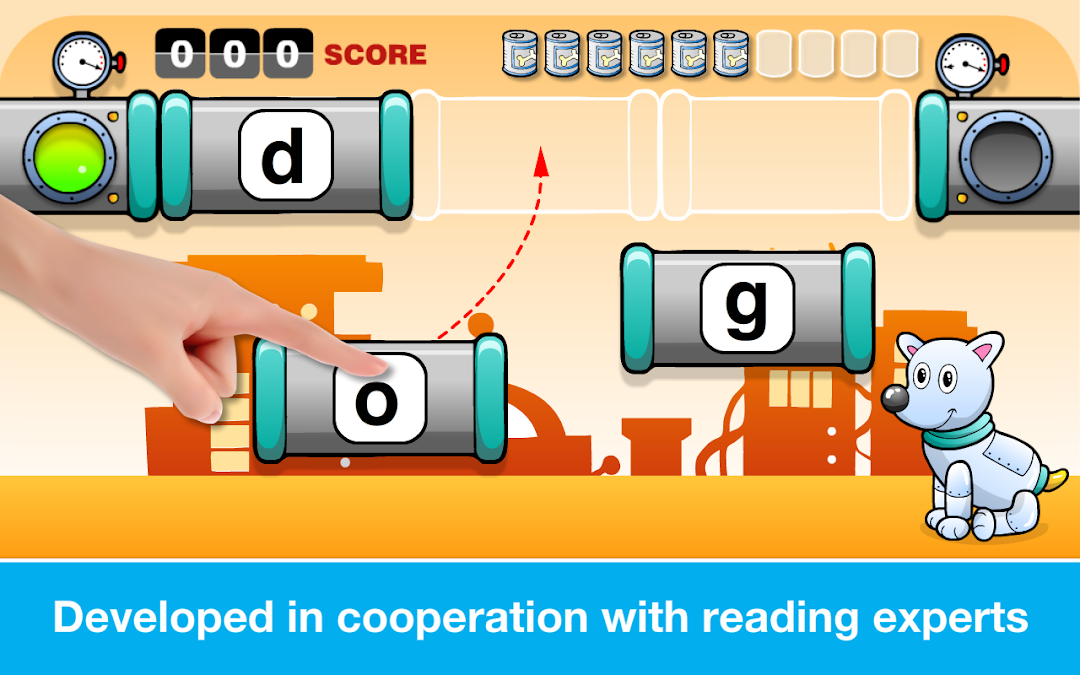
Your dog is hungry! Make cans to feed him! To make a can, drag the letter cards to their correct place and make a word you have just heard pronounced.
3. BINGO
Make a Bingo to get a ticket for Aliens back home! Tap on the word corresponding to the one that you heard pronounced. Once you have matched cards from one side of the board to the next... Bingo! Aliens are back home!
4. MEMORY GAME
Match the sounds to correct word forms! To do so, tap on one of the speakers, hear the word, and then select one of the cards below with a correct word. Do it for all words!
5. GEARS
Tap on one of the speakers on the screen, hear the word pronounced, and place the word across the speaker. Repeat for all words to see wonderful gears animation.
6. FLASH CARDS
Practice in the Flash Card mode. List through the words and top on the cards to hear the words pronounced again and again!
-----
Additional Features Include:
- Selection of individual words to be practiced within each category
- Avatar selection
- Choice of capitalized words and upper-case or lower-case letters
- Access to best scores
-----
Get this app now and enjoy the progress your children are going to make in their reading skills.
22learn, your trusted educational apps developer